


Bravo Bingo-Lucky Bingo Game
4.94.35K Reviews
App Specs
- Version
- 1.61
- Updated On
- License
- Free
- Downloads
- 1,000,000+
- Developer
- TRIWIN
- Categories
- Board
- Platform
- Android
Screenshots



 Analysis by AppCompare
I tend to judge a mobile bingo game by two practical questions: can I follow what is happening without effort, and does it fit into the kind of short break when I actually want to play? Bravo Bingo-Lucky Bingo Game makes a bright first impression, but its appeal depends on more than cheerful presentation. The useful question is whether its pace, visual style and optional spending suit your habits. I found it easiest to approach as a casual board game for brief sessions, rather than something that needs a long, focused stretch.
Who is likely to enjoy it
If you already enjoy bingo and want a phone-based version with a lively setting, this is the clearest fit. The familiar number-and-pattern objective gives newcomers a simple way in, while the themed presentation and social emphasis offer more atmosphere than a bare digital bingo card. TRIWIN develops the game, which is free to start, and its Everyone age rating makes it broadly positioned for casual play. That rating is not a promise that every screen or interaction will suit every person, though; individual comfort with visual effects, small touch targets or chat is still worth considering.
It may also work for someone who likes a light activity alongside a conversation or a quiet break. I would be more cautious about recommending it to a player who wants a purely offline, distraction-free puzzle, or someone who dislikes optional purchases and reward prompts in free games. Bingo is based on called numbers and chance, so the extra game elements may make sessions feel livelier without turning outcomes into something a player can reliably control.
Readability and finding your way around
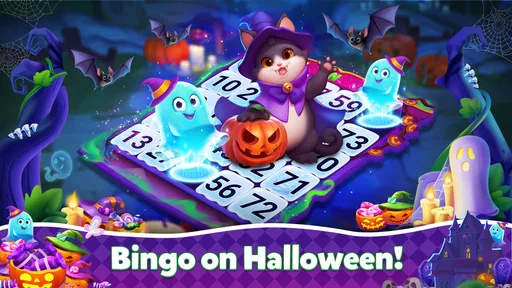
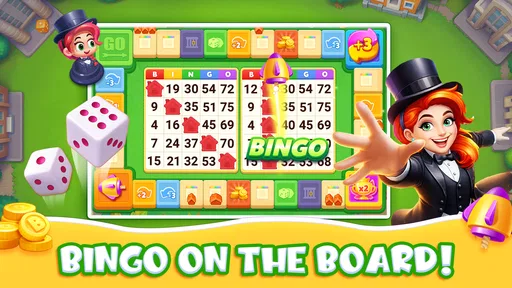
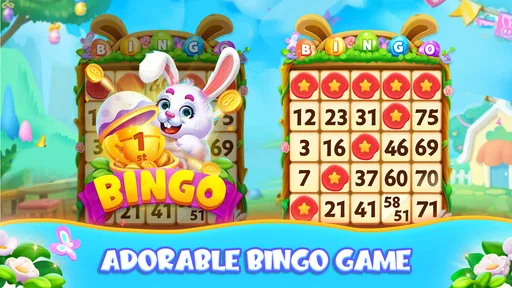
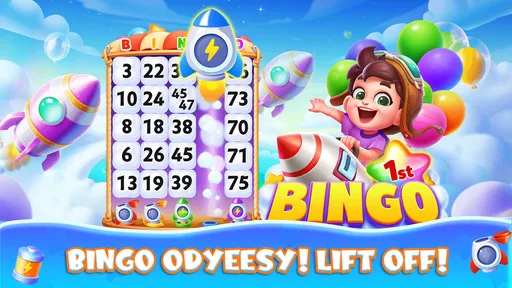
The original impression is of a colorful, animated bingo hall, and that style helps communicate that this is meant to feel social rather than like a spreadsheet of cards. For me, the trade-off is familiar: bright graphics can make a game inviting, but they can also compete with the information I need to track. If you are sensitive to visual clutter, give yourself a moment in a low-pressure session to see whether the numbers, card markings and called numbers remain easy for you to distinguish while animations are moving.
A practical way to check this is to play one round without trying to maximize every opportunity. Watch how your eyes move between the called number and your cards, and notice whether you can comfortably keep your place. If you find yourself repeatedly scanning back or losing track, the visual style may be more demanding than a plain bingo app. I would not assume that a bright interface is automatically easy to read for everyone; contrast, screen size and personal vision all affect the experience.
The game’s stated version is 1.56, and its minimum operating-system requirement is Android 6.0. Those details make it easier to judge basic device compatibility, but they do not tell you how well the app will feel on every screen. If you use an older or compact phone, I would check that the card layout is comfortable before settling into longer rounds. Likewise, keep the device’s text and display settings in mind: system-level adjustments can help with some apps, but they cannot necessarily change how a game has arranged its own cards and controls.
Motor and sensory comfort
Bingo has an appealing low-entry barrier because the central idea is simple: follow numbers and mark a pattern. That is different from a game built around rapid aiming or complicated combinations, and it can make the basic activity approachable for people who prefer straightforward rules. Still, marking cards involves repeated touch input, and several cards or opportunities can increase the amount of visual checking and tapping. If precise or frequent taps are uncomfortable, try a short session first rather than assuming the familiar rules guarantee easy handling.
Worth Reading Before You Choose

EA SPORTS FC Mobile 26 Is a Bigger Football Game, but It Takes Time

Flipboard Shows What News Apps Must Do Beyond the Feed

Switching to Android Auto Means Rethinking Your Driving Routine

Google Calendar Makes a Crowded Week Easier to Manage

Ludo King Makes the Most of the Minutes Between Plans

Baby Panda World Brings Quick Play to Modern Phones, but Its Game Library Feels Busy
The lively animations may add charm, but they are also a sensory consideration. Some players enjoy movement and celebration because they make a win feel more expressive; others prefer a calmer screen, especially when playing in a quiet setting or when motion is tiring. I would test the experience with sound at a comfortable level and pay attention to whether animation or repeated effects distract you from the numbers. I am not claiming dedicated accessibility controls here; the sensible approach is to evaluate what you can adjust on your device and whether the game itself feels manageable as presented.
Chat adds another kind of access question. Social play can make a virtual hall feel less solitary, but it also asks for extra attention and may not be welcome every time you open the game. If you want a quiet round, treat conversation as optional in your own routine and focus on the cards. If you are choosing the game for a younger player, the Everyone label should not replace an adult’s judgment about online interaction or in-app spending.
Where it fits in an ordinary day
I can imagine opening it during a short wait, such as while sitting before an appointment, provided I have enough time to finish a round without needing to rush away. That is a better use case than starting when I have only a few seconds: keeping track of called numbers and cards takes attention, and an interruption can make a session less relaxing. At home, it could also be a casual shared activity when friends already enjoy bingo, though a phone game is not quite the same as gathering around physical cards.
Compared with a stripped-down bingo app, this one leans toward atmosphere, social interaction and additional game mechanics rather than just reproducing a simple paper-card experience. That may be a plus if you want a sense of a virtual hall and reasons to return. A basic digital bingo alternative is likely the better choice if you want fewer distractions, a quieter presentation or a more direct route from opening the app to playing. For a group in the same room, real cards may be easier to follow together and do not put each person behind a separate screen.
Spending, pacing and sensible limits
The game is free to download, but optional in-app purchases are listed from $0.99 to $249.99 per item. That is a broad range, so I would treat any purchase as a deliberate choice rather than as a routine part of playing. Before spending, decide what you are comfortable with and whether the item solves a real problem for you; extra game resources do not change the fact that bingo outcomes involve chance. If you share a device or payment method, make sure purchase controls are appropriate for everyone who can access it.
One useful habit is to try the ordinary play loop before buying anything. That lets you distinguish between enjoying bingo itself and feeling drawn into spending because you want to keep a session going or progress faster. Free-to-play games can make optional extras feel convenient in the moment, so pausing before a purchase is especially sensible if you are playing casually. If you would rather avoid that decision entirely, a simpler game with no purchase prompts may be a better match.
Its audience response is strong: Bravo Bingo has a 4.9 average from around 49,000 ratings, alongside more than 4,000 written reviews, and it has passed a million installs. That suggests plenty of people have chosen to try it, but popularity cannot tell me whether its animations, chat or monetization will suit your preferences. I would use those figures as context, not as a substitute for checking the feel of a round yourself.
Getting Started with Bravo Bingo
First things first, downloading Bravo Bingo-Lucky Bingo Game was a breeze. Available on both Android and iOS, it’s just a quick tap away. Once installed, the app welcomes you with a vibrant and user-friendly interface. The colors are bright and the graphics pop, making it immediately appealing.
Jumping into the game, you’ll find yourself in a virtual bingo hall. The atmosphere is lively with cheerful animations that make the gaming experience immersive. The app offers various bingo rooms, each with its unique theme and style, which keeps things fresh and exciting.
Gameplay and Features
Playing bingo on this app is straightforward and enjoyable. You start with a set of bingo cards, and as the numbers are called out, you mark them on your cards. The objective is to form a specific pattern to call out "Bingo!" and win prizes. The thrill of chasing that winning pattern is what keeps you on the edge of your seat.
What really sets this game apart are the bonuses and power-ups. These features add a strategic layer to the traditional bingo game, keeping you engaged and eager to play round after round. You can earn extra points, gain more cards, or even boost your chances of winning big.
Social Elements
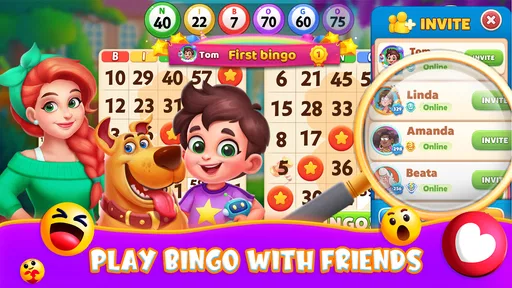
One of my favorite aspects of Bravo Bingo is its social dimension. You can connect with friends or make new ones in the game’s chat rooms. It’s like being in a real bingo hall, chatting and having a good time with fellow bingo enthusiasts. The game even hosts tournaments and special events, giving you an opportunity to compete and show off your bingo prowess.
The app also integrates seamlessly with social media, allowing you to share your achievements and invite friends to join in on the fun. It’s perfect for those who love a bit of social interaction while gaming.
In-App Purchases and Ads
Now, let's talk about the in-app purchases. Like many free-to-play games, Bravo Bingo offers the option to buy additional coins or power-ups. While it’s entirely possible to enjoy the game without spending a dime, the purchases can enhance your experience if you’re looking to level up faster.
As for ads, they are present but not intrusive. They pop up occasionally, typically offering rewards in exchange for watching, which I find to be a fair trade-off.
Final Thoughts
All in all, Bravo Bingo-Lucky Bingo Game is a delightful app that captures the excitement of real-life bingo while adding its unique twists. Whether you’re a seasoned bingo player or new to the game, there’s something here for everyone. The combination of engaging gameplay, social interactions, and vibrant design makes it a must-try for anyone looking to have some fun on their mobile device.
So, next time you’re in the mood for a game that’s both relaxing and thrilling, give Bravo Bingo a spin. You might just find your new favorite pastime!
Pros
- User-friendly interface
- easy to navigate.
- Variety of bingo rooms to keep things fresh.
- Daily bonuses increase player engagement.
- Multiplayer mode enhances social interaction.
- Regular updates with new features.
Cons
- Ads can be intrusive during gameplay.
- In-app purchases can be pricey.
- Requires constant internet connection.
- Limited offline play options.
- Occasional bugs may disrupt sessions.
FAQs for Bravo Bingo-Lucky Bingo Game
What is Bravo Bingo-Lucky Bingo Game about?
Bravo Bingo-Lucky Bingo Game is a dynamic and engaging bingo app that offers a modern twist on the classic bingo experience. Players can enjoy multiple game rooms, each with unique themes and challenges. The app provides both single and multiplayer modes, allowing for a social gaming experience with friends or players worldwide.
Is Bravo Bingo-Lucky Bingo Game free to play?
Yes, Bravo Bingo-Lucky Bingo Game is free to download and play. However, it offers in-app purchases for various virtual items and power-ups that can enhance your gaming experience. Players can choose to purchase these items, although it is possible to enjoy the game without spending money.
What are the system requirements for Bravo Bingo-Lucky Bingo Game?
Bravo Bingo-Lucky Bingo Game is compatible with both Android and iOS devices. For Android users, it typically requires version 5.0 and up, while iOS users need iOS 10.0 or later. It's recommended to have a stable internet connection for a smooth gaming experience, especially in multiplayer modes.
Does Bravo Bingo-Lucky Bingo Game have any social features?
Yes, the app includes a variety of social features. Players can connect with friends through social media integrations, join or create clubs, and participate in multiplayer games. There are also leaderboards and daily challenges that encourage friendly competition and interaction with other bingo enthusiasts.
Are there any privacy concerns with Bravo Bingo-Lucky Bingo Game?
Bravo Bingo-Lucky Bingo Game takes user privacy seriously. The app collects minimal personal information and adheres to industry standards for data protection. Users are encouraged to review the app’s privacy policy for detailed information on what data is collected and how it is used to ensure their comfort and security while playing.


